Unit Tests#
As of writing, there are 308 unit tests that cover each class. Every processor class (ex. docx-processor) has its respective test file, with the exception of the directory processor which has 1 test file per class method.
Unit Testing Overview#
This section serves as an introduction to unit testing, specifically with the pytest library.
Design#
Unit tests are typically written in the tests/ folder which is on the same level as the src/ folder. Assuming the modules in the src/ folder are packaged appropriately, the unit tests can directly access source code via from file_processing.file_name import Class.
Writing unit tests is similar to writing normal Python conditions, but with assert statements and having each test in its separate function. A good practice is to break down tests into small units such that each test will test for a very specific functionality, as opposed to a big test with many assertions.
Fixtures and conftest.py#
Fixtures create generic objects that can be reused by multiple tests. For example, when testing the Directory class’s reports, we have a fixture to:
create the
Directoryobjectcreate the report with the given input into a temporary CSV path that will be removed
read the CSV into a
pd.DataFrameobject
@pytest.fixture
def mk_get_rm_dir(filters, threshold, top_n, use_abs_path, tmp_path_factory):
    output_path = str(tmp_path_factory.mktemp("outputs") / "test_output.csv")
    dir1 = Directory('tests/resources/similarity_test_files')
    dir1.identify_duplicates(output_path, filters, threshold, top_n, use_abs_path)
    data = pd.read_csv(output_path, index_col=0)
    yield data
Fixtures are defined in unit tests as a function parameter, and can be directly called to access the data or object in the fixture’s return value. In the case of the mk_get_rm_dir fixture above, the unit test would have access to the DataFrame based on the inputs it provided in the function parameters.
conftest.py can be used to reduce redundance when fixtures are re-used across several test files. Any fixtures defined in conftest.py are accessible to all test files without having to import them. We use this to define File objects on copies of the original test file (which prevents modification of their metadata).
Parametrization#
To further reduce redundancy, parametrization allows test functions to iteratively test a list of inputs and expected outputs. First a list of variable names and values are defined as constants, and then the test function is parametrized with the specific variable names:
variable_names = "path, bitrate, length, artist, date, title, organization"
values = [
    ("tests/resources/test_files/sample_speech.aiff", 256000, 3.18, '', '', '', ''),
    ("tests/resources/test_files/sample_speech.flac", 109089, 14.92, '', '', '', ''),
    ("tests/resources/test_files/sample_speech.mp3", 24000, 15.012, '', '', '', ''),
    ("tests/resources/test_files/sample_speech.mp4", 58503, 14.804, '', '', '', ''),
    ("tests/resources/test_files/sample_speech.ogg", 48000, 14.97, '', '', '', ''),
    ("tests/resources/test_files/sample_speech.wav", 256000, 14.92, '', '', '', '')
]

...
@pytest.mark.parametrize(variable_names, values)
def test_audio_metadata(path, bitrate, length, artist, date, title, organization):
    # Do something
Test Mocks#
Test mocks enable us to force a function to output a certain value. This is generally used when it is impossible or undesirable to test the actual functionality. For example, mocks would be ideal for code that involves calls to an expensive API. In this case, we would want to mock the API so it is not called, and in doing so, the code would effectively test whether the API is called, rather than if the return value is accurate.
We write test mocks using the built-in unittest.mock library. There are various approaches to test mocks, but we use patch to mock methods belonging to both external libraries and our own library. Below are 3 examples adapted from the file_processing_library:
This is a mock of the external pytesseract.image_to_string() function. Rather than run the time-consuming OCR, we force the mock to return a certain value and assert the mock is called:
import re
import os
from unittest.mock import patch
from file_processing import File

@patch('pytesseract.image_to_string')
def test_ocr_processing_success(mock_tesseract):
    image_path = os.path.normpath('tests\\resources\\test_files\\test_ocr_text.jpg')
    mock_tesseract.return_value = 'Test OCR'
    file = File(image_path, use_ocr=True)
    result = re.sub('[^A-Za-z0-9!? ]+', '', file.metadata['ocr_text'])

    assert result == 'Test OCR'

    _, file_extension = os.path.splitext(file.file_name)

    if file_extension != '.pdf':
        mock_tesseract.assert_called_once_with(image_path)

test_ocr_processing_success()
The transcription library is also an external dependency and is mocked in a similar fashion:
from unittest.mock import patch
from file_processing import File

def test_mock_transcription(path, transcription):
    mocked_value = {
        'text': transcription,
        'language': 'en'
    }
    with patch('whisper.transcribe', return_value=mocked_value) as mock_transcribe:
        audio_file = File(path, use_transcriber=True)
        mock_transcribe.assert_called()
        assert audio_file.metadata['text'] == transcription

test_mock_transcription(
    path='tests/resources/test_files/sample_speech.aiff',
    transcription='mocked text'
)
Finally, the File object is an internal class and the below test is used to check whether access times are retained. This is done by checking whether the mocked object’s open_file property is correctly set to False.
from unittest.mock import patch
from file_processing import Directory

def test_not_opening_files_in_directory(directory_path):
    output_path = 'temp.csv'
    with patch('file_processing.File', autospec=True) as mock_file:
        dir1 = Directory(directory_path)
        dir1.generate_report(str(output_path), open_files=False)
        for call in mock_file.mock_calls:
            args, kwargs = call[1], call[2]
            assert kwargs.get('open_file') == False, "File was opened when it should not have been"

test_not_opening_files_in_directory('tests/resources/directory_test_files/')
Setup and Running#
Unit tests can either be run through the IDE’s test runner or from terminal. For running on terminal, use pytest tests/ (or pytest tests/test_file.py to test a specific function). For running on the IDE, navigate to the testing tab on the left, and configure tests like so:
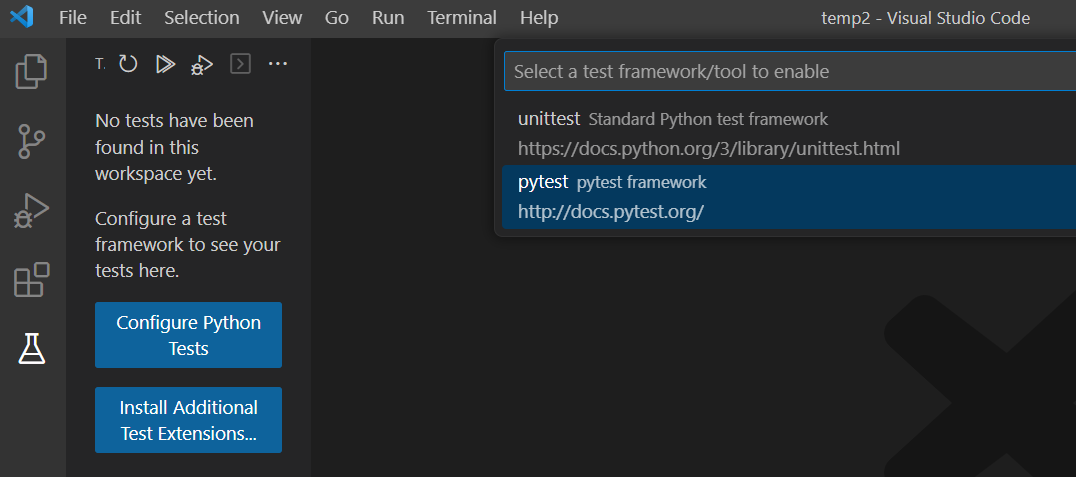
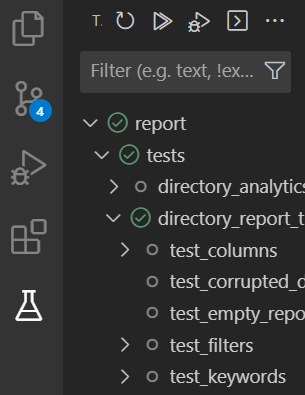
It may take a few moments to finish setup, but afterwards, these tests will automatically refresh when the code is saved, and they can be executed via the run button at the top of the test runner menu. This runner provides a user-friendly way to run specific tests and see which tests pass or fail.
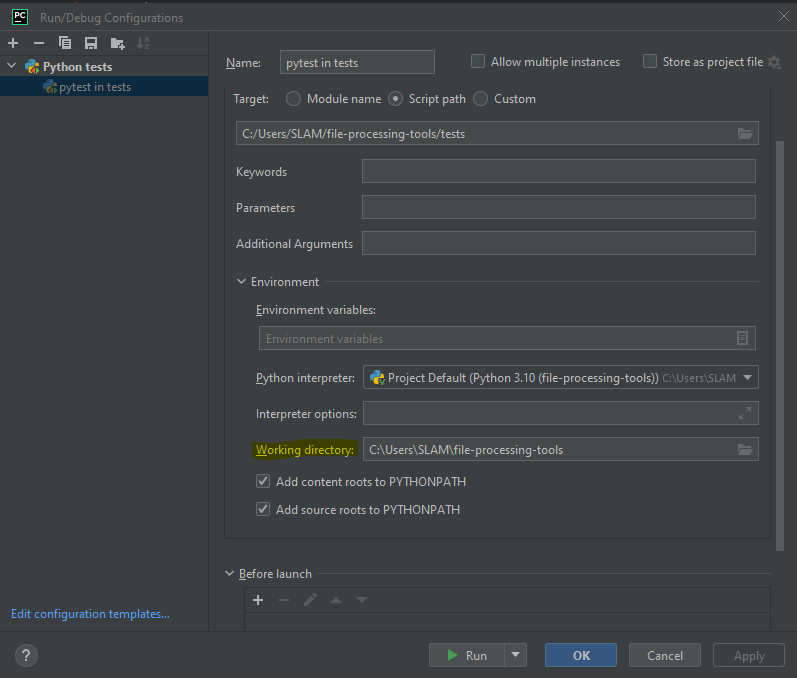
In PyCharm, it’s necessary to specify the project root as the Working Directory in the test configuration when conducting tests. To do so, navigate to Run > Edit Configurations from the top-left menu. While most IDEs, such as VSCode, typically default to using the project root as the working directory for tests, it’s recommended to confirm this setting in your IDE as configurations may vary.
Test Coverage#
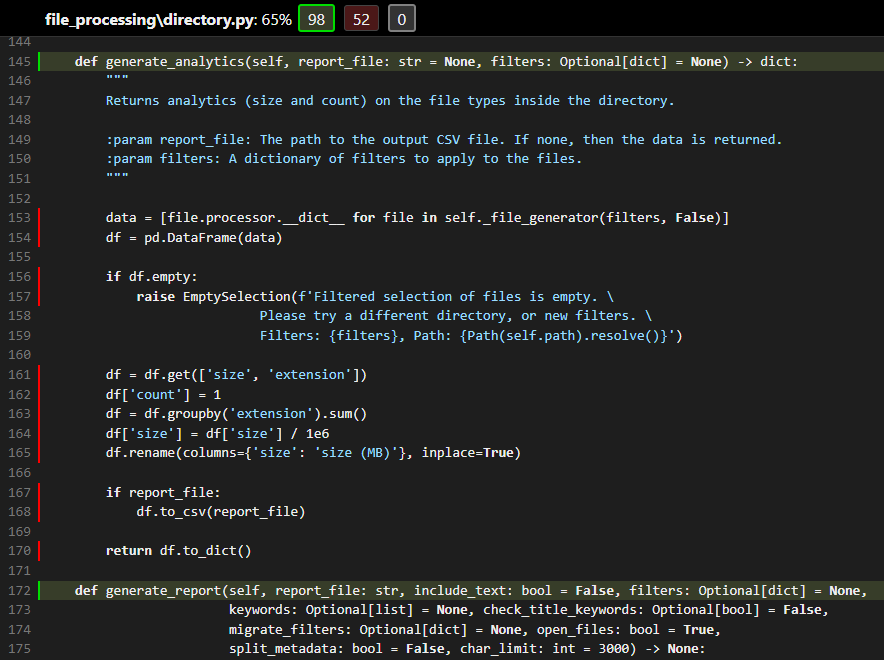
Test coverage can be roughly estimated via the pytest-cov extension that must be separately installed. Run pip install pytest-cov then pytest --cov=file_processing --cov-report=html tests/ to generate an HTML report in the project’s root directory. Note that this runs all unit tests so it may take a while to execute.
An example is shown below for the directory_report_test
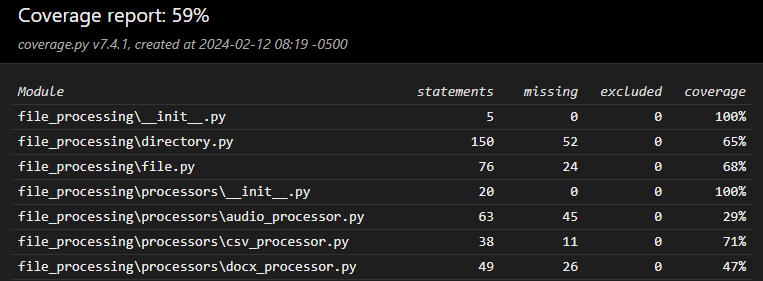
It also specifies exactly what part of the original Directory class is lacking tests
Debugging#
Unit tests must first be ‘discovered’ (ie detected) so the runner can begin execution. This is the step where errors are detected. Hover over the error indicator on the 2nd line to reveal the error message:
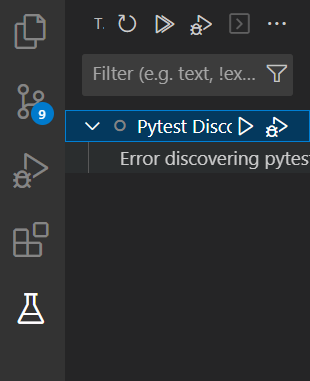
Alternatively, run pytest --collect-only -q to try to collect the tests. Any errors will appear in the terminal.
File Unit Tests#
These are the test files named test_[extension]_processor.py and they all share a similar structure with similar tests:
test_metadata: Tests if all the file-specific metadata fields are presenttest_save_metadata: Tests if the.save()method workstest_invalid_save_location: Tests if the correct error is thrown upon trying to save in an invalid locationtest_not_opening_file: A mock test to see if the file is opened whenopen_file=False
Each test file also has its own resources that it uses to create File objects with. These are located in the tests/resources/test_files directory. There should be at least 2 distinct resource files per test to ensure a reasonable test coverage.
Directory Unit Tests#
The Directory tests encompass 3 files - one for each report (metadata, analytics, similarity). Each of them uses a similar mk_get_rm_dir fixture that (1) initializes the Directory object, (2) creates the specified report in a temporary location, and (3) reads and returns the CSV report as a pd.DataFrame object.
This pd.DataFrame object is read and tested by each test function. In general, there is a 1-to-1 match between Directory report parameters and test functions. For example, there are keywords, filters, and migration_filters tests.
Note that unit tests typically receive some hardcoded input and are checked against some hardcoded, expected output, but the Directory unit tests only receive the inputs. The outputs are separately computed. This is due to the variability and large amount of data contained in each report that makes it infeasile to hardcode the outputs.