Generating a metadata report from a directory#
Report Formatting#
Parameters - split_metadata
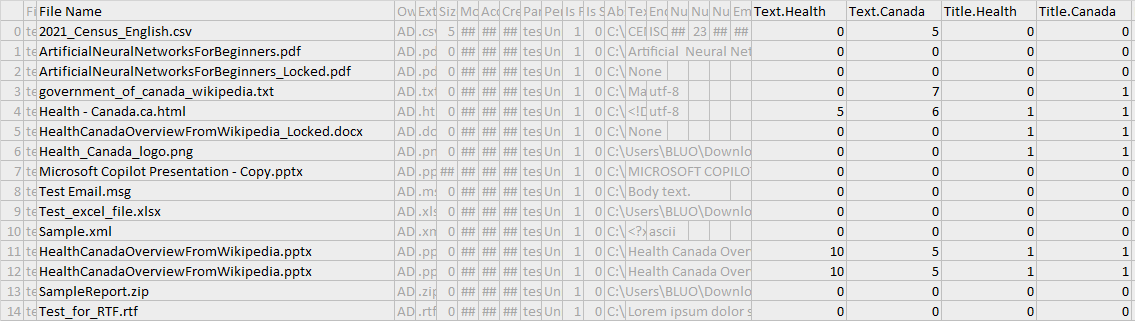
This parameter splits the file metadata dictionary such that each key becomes its own column. This is designed to improve readability. If keywords are enabled, then each keyword will also appear in its own column.
The metadata column is a dictionary.

The metadata column is extracted into separate columns.

Filters and Migrate Filters#
Parameters - filters, migrate_filters
Filters are used to determine what files appear on the report. Various options are discussed in Filters.
Migration filters are similar, except they create a Migrate column. Each file then has a 1 if it satisfies the filter criteria, otherwise 0. The purpose of this is to complement the filter option by selectively indicating files to migrate while retaining a wholistic view of the directory contents. The possible values of migrate_filters are the same as the filters options.
The below example demonstrates filtering by file extensions and indicating files to migrate by imposing a maximum byte size.
from file_processing import Directory

directory = Directory('tests/resources/directory_test_files')
directory.generate_report(report_file='temp1.csv',
                          filters={'extensions': ['.csv', '.docx', '.pptx']},
                          migrate_filters={'max_size': 50000})

Text and Keyword Extraction#
Parameters - include_text, char_limit, keywords, check_title_keywords
The include_text parameter decides whether to extract text from files, and the char_limit limit imposes a charater limit on each metadata value.
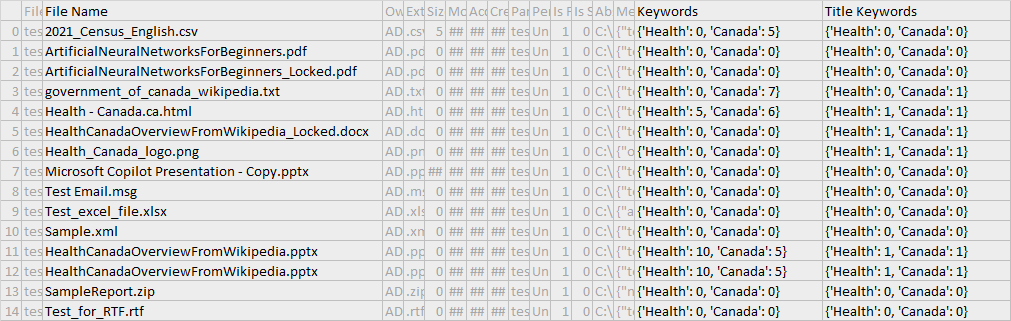
The keywords parameter is a list of words to scan the text for. The number of keywords that appear in the text metadata will be summed and displayed. If check_title_keywords is enabled, the the file name will also be searched for keywords. Note that include_text=True is required to search for keywords in the text, but not for searching for keywords in the file name. Finally, the keyword search is restricted by the char_limit. For example, if the char_limit=100, then only the first 100 characters are searched for the keyword.
from file_processing import Directory

directory = Directory('tests/resources/directory_test_files')
directory.generate_report(report_file='temp1.csv',
                          keywords=['Health', 'Canada'],
                          check_title_keywords=True,
                          include_text=True,
                          char_limit=1000,
                          split_metadata=True)
The keywords columns are kept in their respective columns in a dictionary format.
The keywords columns are split by each word.
File-specific Metadata#
Parameters - open_files
This setting controls whether file-specific metadata is computed. When set to False, files will not be openned and only generic metadata will be extracted. The runtime will also be drastically faster.
Only generic metadata appears.

The metadata column with file-specific metadata appears.

Batch Running#
Parameters - batch_size, recovery_mode, start_at
By default, files are read, filtered, then processed in batches of 500 before being written to the output CSV. This is to prevent losing all data if the program were to crash. A higher batch size is recommended for larger directories.
Related to the issue of crashing is the option to enable recovery_mode, which reads how far the last execution got based on how many lines are in the CSV file. It will then compute the start_at index, which is the nth file to start processing at (irrespective of filters). This start_at parameter can also be manually set. Also note that recovery_mode will prevent the overwriting of the existing report - any further data will be appended to what is already there.
Usage: By default, batch_size=500, recovery_mode=False, start_at=0. Suppose we are processing a large directory of ~10000 files and the program just crashed so we have an incomplete report. We would want a larger batch size and to enable recovery_mode:
from file_processing import Directory

directory = Directory('.')
directory.generate_report(report_file='metadata.csv',
                          batch_size=1000,
                          recovery_mode=True)